Intro
A few weeks ago we introduced the "Snapshot" mode of Content Island, a way to combine SSR technologies like Astro, Next.js, or TanStack Start with performance very close to that of a static site.
The idea is simple: instead of querying the Content Island API on every request, you export your project's content to a single snapshot (images and videos are still served from the CDN) and your application loads that snapshot entirely in memory.
With a single change in the configuration, your entire application reads from that local copy.
export const contentIslandClient = createClient({
  accessToken: ENV.CONTENT_ISLAND_TOKEN,
+  mode: 'snapshot',
});
The result is virtually instant access to the content, avoiding constant API calls.
But a question quickly arises:
What happens when the content changes?
The traditional solution is to trigger a new build every time someone publishes content. This is a valid approach and sufficient for many projects.
However, when content changes multiple times a day, continuously rebuilding and deploying ceases to be the best option.
What if, instead of rebuilding the entire application, we simply replaced the snapshot in memory?
That is exactly what we call Dynamic Snapshot.
Dynamic Snapshot
We have added a new feature to the Content Island client API SDK that allows reloading a snapshot in memory without needing a new build.
export const contentIslandClient = createClient({
  accessToken: ENV.CONTENT_ISLAND_TOKEN,
  mode: "snapshot",
  snapshotLoader: async () => {
    // Returns the snapshot JSON (string or object) from wherever you want
  },
});

// When content changes (webhook, interval, pub/sub):
const result = await contentIslandClient.refreshSnapshot();
// -> { status: 'updated' | 'unchanged', meta: {...} }
Everything revolves around two concepts:
snapshotLoader→ where to get the snapshot from.refreshSnapshot()→ when to update it.
refreshSnapshot() re-executes the snapshotLoader and, if a newer version exists, performs an atomic replacement of the snapshot in memory. Concurrent requests always use a complete version of the content.
💡 The initial snapshot can be obtained via
npx content-island export(you must have previously installed the API client packagenpm install @content-island/api-client) or directly from code withexportSnapshot().
💡 A highly recommended strategy is to generate the snapshot during the CD process and deploy it along with the application. If the export fails, the pipeline will also fail, preventing inconsistent deployments. Additionally, the application will have a snapshot from the first request, and
refreshSnapshot()will keep it updated afterwards.
Update Strategies
All strategies follow the same pattern:
- Export the snapshot.
- Store it in an accessible place.
- Detect when the content changes.
- Execute
refreshSnapshot().
The only difference is where the snapshot lives and who triggers the update.
Option 1 --- Read directly from the API
Ideal for a single instance or very few.
The snapshotLoader itself uses exportSnapshot() to get the snapshot directly from Content Island.
Flow:
Publish → Webhook → GitHub Action → Protected endpoint →
refreshSnapshot()
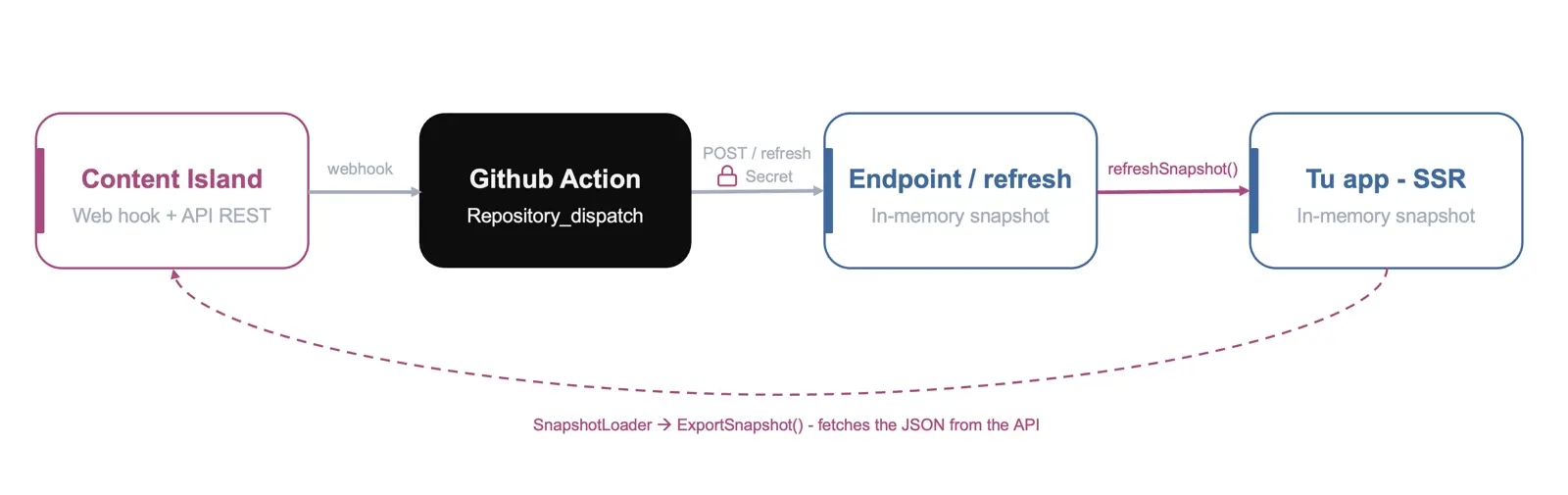
When creating the client, you indicate that you want to use snapshot mode and pass a snapshotLoader that loads from the Content Island API:
import { createClient, exportSnapshot } from "@content-island/api-client";

export const contentIslandClient = createClient({
  accessToken: ENV.CONTENT_ISLAND_TOKEN,
  mode: "snapshot",
  snapshotLoader: async () =>
    exportSnapshot({ accessToken: ENV.CONTENT_ISLAND_TOKEN }),
});
And when is it refreshed? You expose a small endpoint (for example POST /api/content-island/refresh) that runs contentIslandClient.refreshSnapshot(). The chain is: Content Island publishes content → triggers a GitHub Action (via repository_dispatch) → the Action calls your endpoint → your app refreshes the JSON in memory instantly.
⚠️ Protect that endpoint. Anyone who discovers the URL can invoke it, creating an abuse vector (for example, forcing exports against the API repeatedly). One way to mitigate this is to add a shared secret / API key that the Action sends in a header and your endpoint validates before doing anything.
An example GitHub Action flow that acts as a trigger:
name: Refresh Content Island snapshot
on:
  # Content Island triggers this Action when publishing content (via its webhook)
  repository_dispatch:
    types: [content-updated]
jobs:
  refresh:
    runs-on: ubuntu-latest
    steps:
      # Calls your app's endpoint to execute refreshSnapshot()
      - name: Notify app to refresh snapshot
        run: |
          curl -fsS -X POST "$APP_URL/api/content-island/refresh" \
            -H "x-refresh-secret: $REFRESH_SECRET"   # shared secret: endpoint validates it
        env:
          APP_URL: ${{ secrets.APP_URL }}
          REFRESH_SECRET: ${{ secrets.REFRESH_SECRET }}
And the endpoint, which validates the secret before refreshing:
// POST /api/content-island/refresh
export async function POST(req: Request) {
  if (req.headers.get("x-refresh-secret") !== ENV.REFRESH_SECRET) {
    return new Response("Unauthorized", { status: 401 });
  }
  const result = await contentIslandClient.refreshSnapshot();
  return Response.json(result);
}
Advantages
- ✅ Very simple.
- ✅ No additional infrastructure.
Disadvantages
- ⚠️ Each instance downloads its own snapshot.
- ⚠️ Scales worse as the number of replicas increases.
Option 2 --- Bucket + CDN
A GitHub Action exports the snapshot once, publishes it to a bucket (S3, R2, GCS, Azure Blob Storage...) and then notifies the application to execute refreshSnapshot().
Applications read the snapshot directly from the bucket.
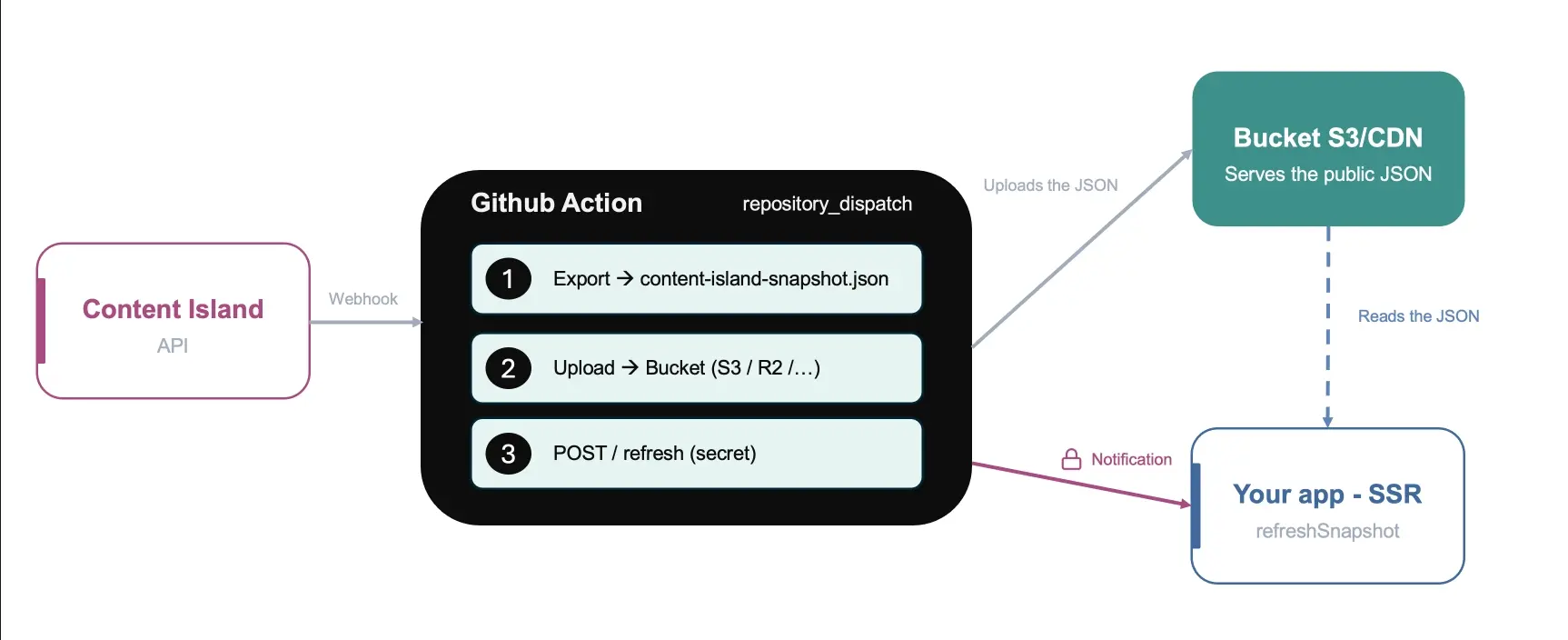
This is where a GitHub Action comes in, triggered by the Content Island webhook (via repository_dispatch):
name: Update Content Island snapshot
on:
  # Content Island triggers this Action when publishing content (via its webhook)
  repository_dispatch:
    types: [content-updated]
jobs:
  export-and-upload:
    runs-on: ubuntu-latest
    steps:
      - uses: actions/checkout@v4
      - uses: actions/setup-node@v4
        with: { node-version: 20 }
      # 1) Download the snapshot from Content Island to a JSON file
      - run: npx @content-island/api-client export --access-token ${{ secrets.CONTENT_ISLAND_TOKEN }} --snapshot-path ./content-island-snapshot.json
      # 2) Upload that JSON to the bucket (from here the new version is served)
      - name: Upload to bucket
        run: aws s3 cp ./content-island-snapshot.json s3://my-bucket/content-island-snapshot.json --acl public-read
        env:
          AWS_ACCESS_KEY_ID: ${{ secrets.AWS_ACCESS_KEY_ID }}
          AWS_SECRET_ACCESS_KEY: ${{ secrets.AWS_SECRET_ACCESS_KEY }}
      # 3) Notify the app to reload in memory (same endpoint as Option 1)
      - name: Notify app to refresh snapshot
        run: |
          curl -fsS -X POST "$APP_URL/api/content-island/refresh" \
            -H "x-refresh-secret: $REFRESH_SECRET"   # shared secret: endpoint validates it
        env:
          APP_URL: ${{ secrets.APP_URL }}
          REFRESH_SECRET: ${{ secrets.REFRESH_SECRET }}
Notice the order: first it uploads the new JSON to the bucket and then notifies the app. This way, when your endpoint executes refreshSnapshot(), the bucket already serves the new version. That endpoint is exactly the same as in Option 1 (protected with the shared secret) — the only difference is where the snapshotLoader reads from.
And in your application, the client consumes the JSON directly from the bucket:
import { createClient } from "@content-island/api-client";

export const contentIslandClient = createClient({
  accessToken: ENV.CONTENT_ISLAND_TOKEN,
  mode: "snapshot",
  snapshotLoader: async () => {
    const res = await fetch(BUCKET_SNAPSHOT_URL, { cache: "no-store" });
    return res.text();
  },
});
Ideally in this scenario, during the CD flow, a first snapshot is downloaded to a known folder on the server where the application will run and used as the first snapshot (so the first user does not have to wait for the JSON to download from the API, and we ensure something is working; if for any reason the Content Island API is unavailable, the deployment would fail and not affect production), and subsequent snapshots are done via the S3 bucket.
A useful trick: you can use getSnapshotInfo() to read the snapshot's meta (exportedAt, schemaVersion...) and decide if it’s really worth reloading or if you already have the latest version.
Advantages
- ✅ Single export.
- ✅ Lower load on the API (only one export per publication, not per instance).
- ✅ Low latency using CDN.
Disadvantages
- ⚠️ Requires maintaining a bucket.
- ⚠️ Propagating refresh to N replicas via webhook starts to get cumbersome... and that leads us to Option 3.
Option 3 --- Redis Pub/Sub
Designed for horizontal deployments with multiple instances.
A single export saves the snapshot in Redis and publishes a Pub/Sub message.
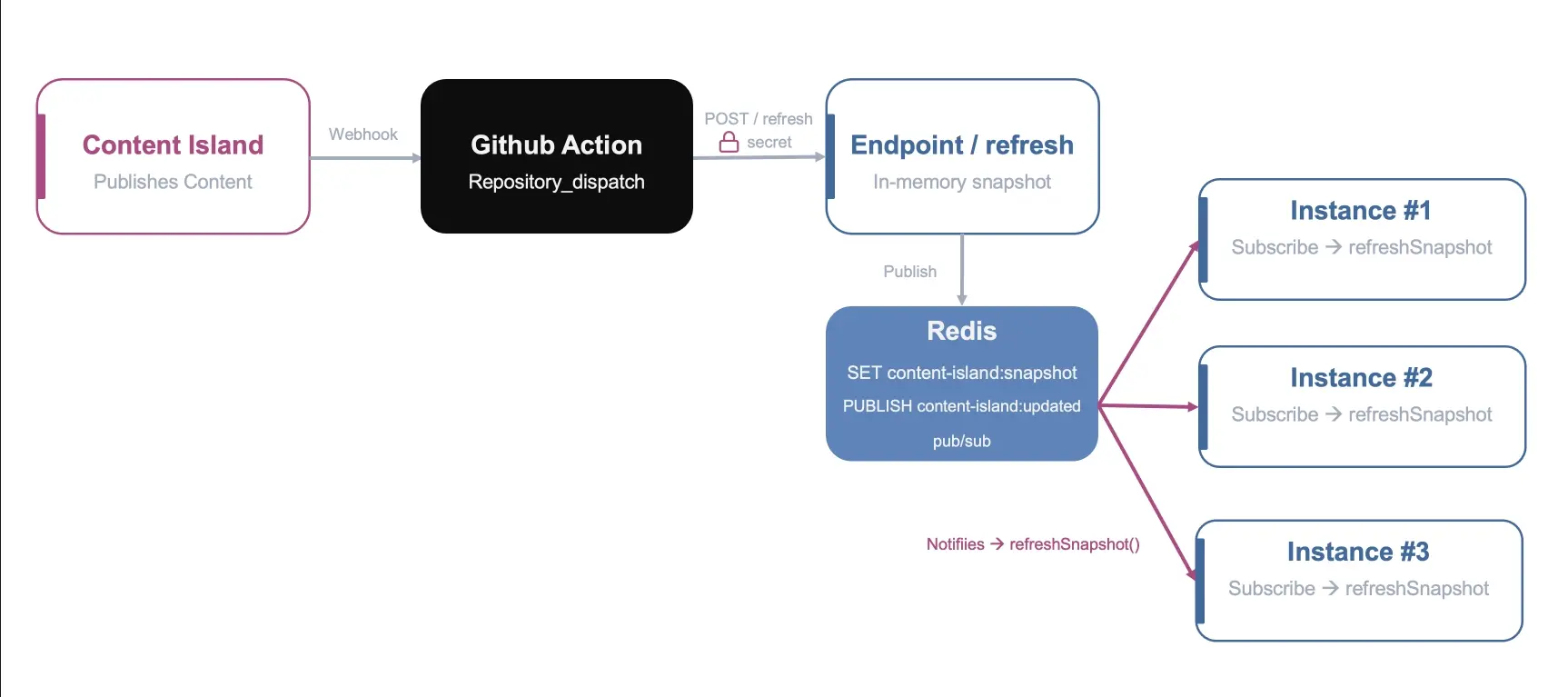
All instances receive the event and execute refreshSnapshot() almost simultaneously.
A single publisher, as before, can use webhooks + GitHub Action to serve as a trigger and call an API method that downloads it, saves it in Redis, and publishes it on a channel:
const snapshot = await exportSnapshot({
  accessToken: ENV.CONTENT_ISLAND_TOKEN,
});
await redis.set("content-island:snapshot", JSON.stringify(snapshot));
await redis.publish("content-island:updated", "1");
Each instance reads the JSON from Redis in its snapshotLoader:
snapshotLoader: async () => (await redis.get('content-island:snapshot')) ?? '',And subscribes to the channel to refresh as soon as the notification arrives:
await sub.subscribe("content-island:updated", () =>
  contentIslandClient.refreshSnapshot(),
);
A single publish and the entire fleet refreshes its JSON in memory at once. No builds, no N API calls, no webhooks per instance.
Advantages
- ✅ Synchronized update.
- ✅ A single export feeds the entire infrastructure.
- ✅ Highly scalable.
Disadvantages
- ⚠️ Requires Redis.
Option ...
These are the three that cover most cases, but remember: since the pattern is always snapshotLoader + refreshSnapshot(), you can adapt it to whatever you have (a message queue, a shared filesystem, your own broker...). The mechanism does not change.
Conclusion
The Dynamic Snapshot mode gives you the best of both worlds: the performance of reading content from a JSON in memory, and the freshness of being able to update it instantly when content changes, without relaunching a build.
You don’t need to start with the most complex architecture. Option 1 perfectly covers most projects. As your needs grow, you can evolve to Option 2 to decouple from the API and, finally, to Option 3 if you need to synchronize multiple instances in real time.
The really important idea is that all strategies share the same pattern: snapshotLoader defines where to get the snapshot and refreshSnapshot() when to update it. exportSnapshot() is simply one way to obtain that snapshot from code. From there, you just have to decide where to store it and how to propagate updates.