Intro
A few weeks ago we explained how Snapshot mode works in Content Island and how to turn it into a Dynamic Snapshot: this mode lets you work in SSR with performance close to SSG. Your Content Island project content is available as JSON on your server, and you can run queries directly in memory. On top of that, every time content changes are published, each instance of your server environment can be updated automatically.
In those articles we covered the general pattern. Now we're going to apply it to a real-world case: an application deployed on Vercel that uses Redis to share the snapshot across its Functions, and a Custom HTTP Webhook to update it whenever content is published.
The full example (a car website built with TanStack Start, Redis and Vercel) is available in this repository, along with two step-by-step guides linked at the end.
The configuration is the same one we saw in the previous article:
export const contentIslandClient = createClient({
  accessToken,
  mode: "snapshot",
  snapshotLoader: loadSnapshotJson,
});
snapshotLoader tells the client where to load the JSON from, and refreshSnapshot() lets you reload it when there's new content. The rest of the application stays the same: you can keep using the same API calls, components, routes and queries.
The problem: in serverless, memory is not the source of truth
On a traditional node server this is fairly simple. The process keeps running, loads the snapshot on startup and keeps it in memory. When you publish a change, it gets notified and reloads the JSON. If you have several instances, you can notify them through Redis Pub/Sub so they all update.
On Vercel the scenario is different. Functions are created and reused depending on traffic, and they can go idle and disappear at any time. Moreover, each instance keeps its own memory. Redis Pub/Sub doesn't fully solve the problem: if a Function is idle when the notification is published, it never receives it and keeps serving an old version of the content.
That's why, in this scenario, memory can only be used as a cache:
Memory is the fastest place to serve content from, but it can't be the source of truth.
The solution is for each instance to periodically check Redis for a new version. This check is very lightweight, since it only needs to read the snapshot's version number.
Responsibilities are split like this:
| Piece | Responsibility |
|---|---|
| Redis | Stores the current snapshot and its version number |
| Function memory | Keeps a local copy to resolve queries |
| Content Island | When content is published, calls the refresh endpoint via a webhook |
| Refresh endpoint | Downloads the new snapshot from Content Island and stores it in Redis |
What the flow looks like
The flow has two parts: updating the snapshot in Redis, and the check each instance performs before responding.
When content is published in Content Island, the Custom HTTP Webhook calls the application's refresh endpoint.
The endpoint downloads the snapshot using
exportSnapshot(), compresses it and stores it in Redis along with its version number.On every request, a middleware checks how much time has passed since the last Redis check.
If the configured interval hasn't elapsed yet, it keeps using the snapshot already in memory, without querying Redis.
Once the interval has elapsed, it reads only the
versionfield from Redis. If it hasn't changed, it keeps using the in-memory copy.If it finds a new version,
refreshSnapshot()downloads the snapshot from Redis and replaces the in-memory copy. That very same request is already served with the updated content.
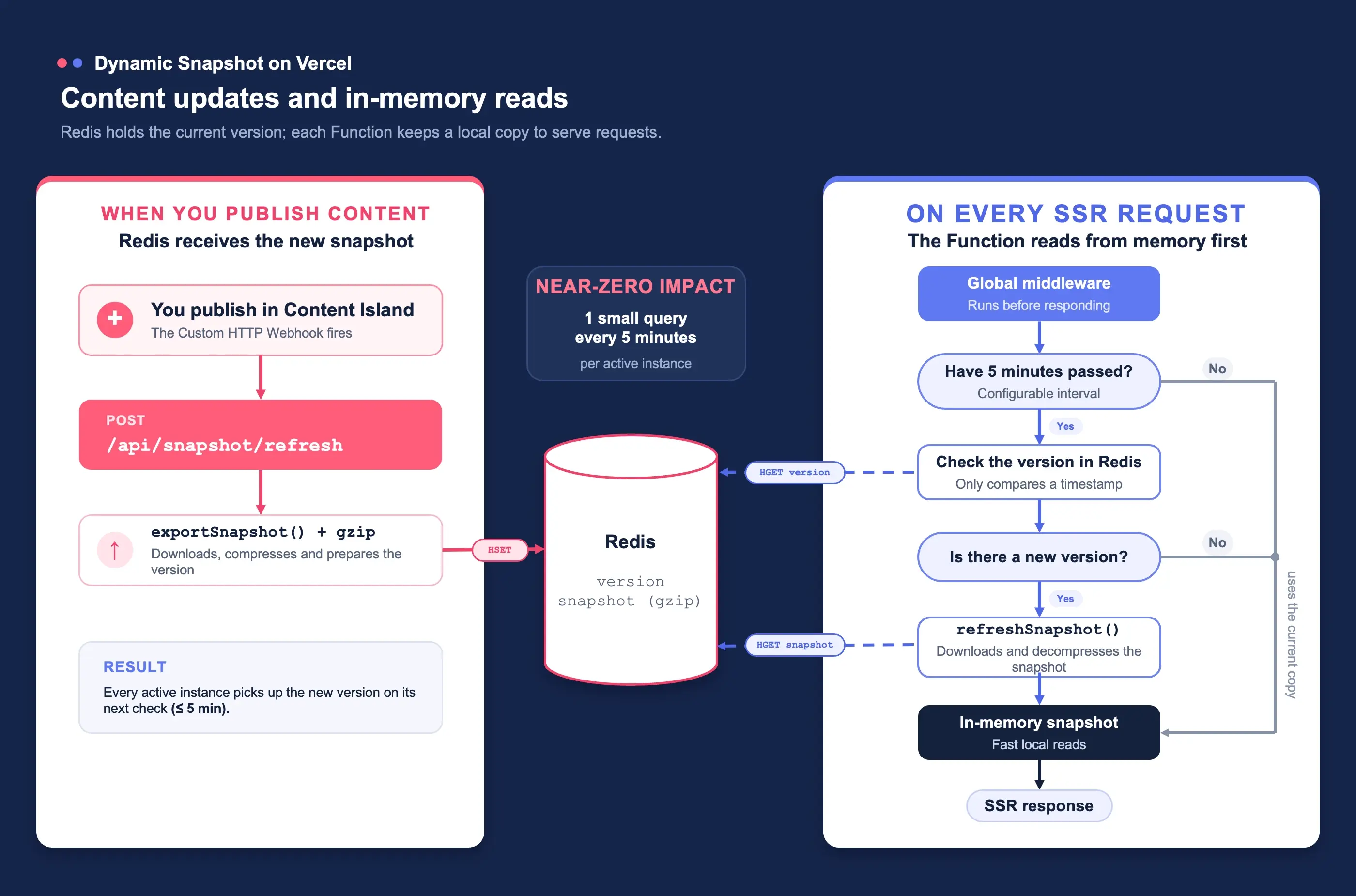
To keep the performance impact of this check to a minimum, Redis isn't queried on every request. The interval is configured through SNAPSHOT_CHECK_INTERVAL_MS; for example, we can set it to five minutes in production.
When it's time to check, only the version field is read, which contains a timestamp and takes up just a few dozen bytes. The full snapshot is only downloaded when that version has changed.
In addition, the version and the compressed snapshot are stored in the same Redis hash using an atomic HSET. This way, an instance can never read the new version together with the previous snapshot's data.
This design introduces a small consistency window: an instance could serve the previous version until it checks Redis again. With a five-minute interval, content will take at most that long to update on an instance that keeps receiving requests. In exchange, Redis is queried at most once every five minutes per instance, so the impact on each response is practically zero (this time window is configurable).
Who sends the notification: the Custom HTTP Webhook
We now have an endpoint that updates the snapshot in Redis and a mechanism for each instance to detect when there's a new version. The next step is to call that endpoint automatically every time content is published.
Content Island offers several ways to automate this process. For example, you can integrate it into a GitHub Actions workflow. On Vercel, however, we can do it in a much more direct way: set up the refresh endpoint as a Custom HTTP Webhook.
Content Island calls the URL you give it directly, with the headers you define.
You set it up in the project's Webhooks section by clicking Add Webhook and choosing Custom HTTP Webhook.
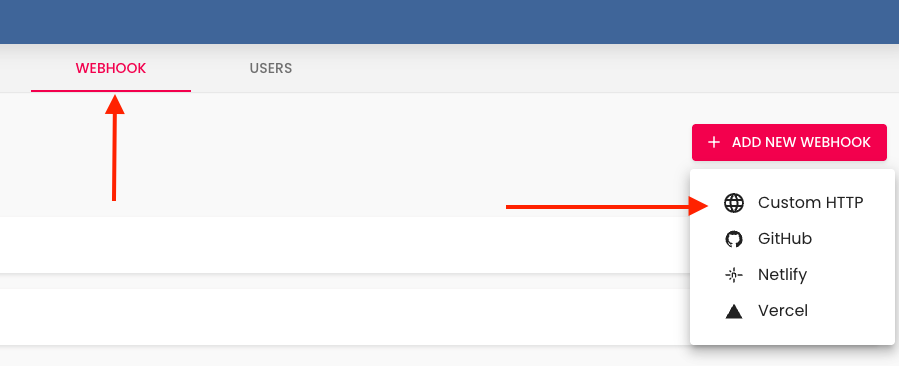
The form is short and has two parts:
- At the top, a name to identify it and the URL of your refresh endpoint, something like
https://your-project.vercel.app/api/snapshot/refresh. - At the bottom, the
Headerssection, where you add one calledx-refresh-secretwith the same value you have inSNAPSHOT_REFRESH_SECRETin your deployment.
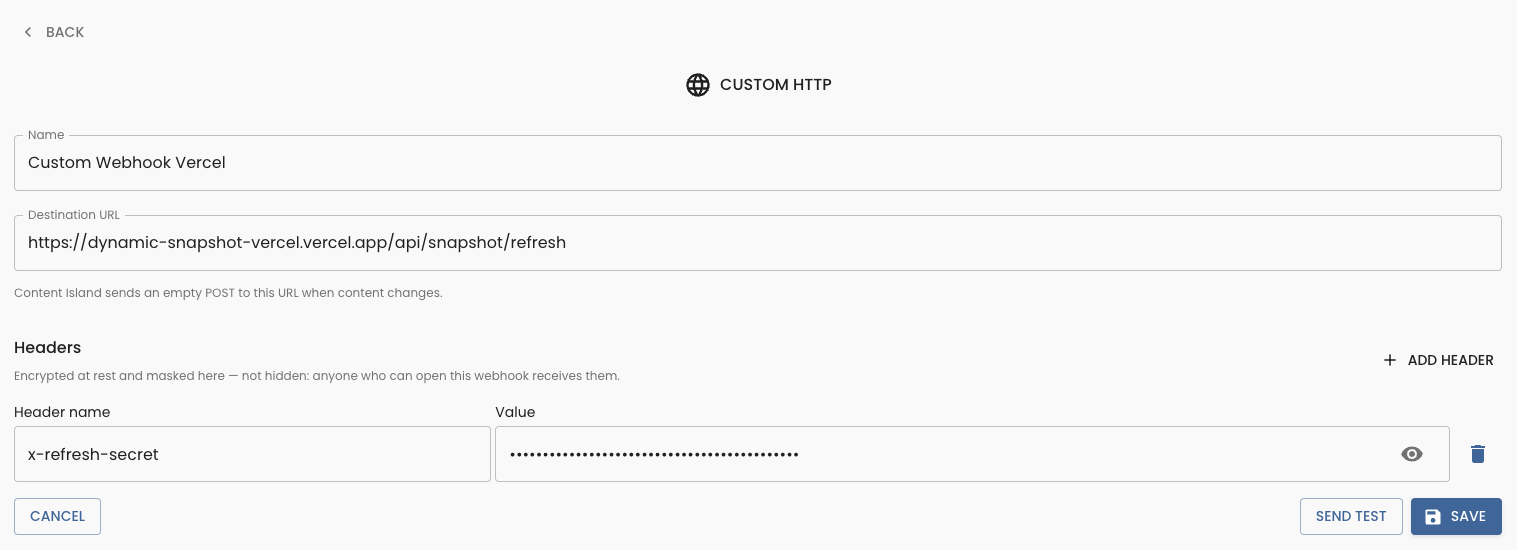
That header is the only thing standing between your endpoint and whoever stumbles upon the URL, so it's a good idea to validate it before doing anything else.
if (!isValidSecret(request.headers.get("x-refresh-secret"))) {
  return Response.json({ error: "Unauthorized" }, { status: 401 });
}
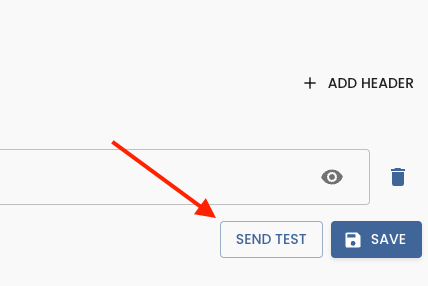
To check that everything is set up correctly, there's a Send Test button that sends the request right away and lets you inspect the response in your provider's logs.
{
  "status": "updated",
  "version": "2026-08-23T14:19:01.116Z",
  "encoding": "gzip",
  "compressedSize": 104292,
  "uncompressedSize": 408067
}
Then all that's left is the real test: change any content in Content and publish it. Content Island calls the webhook, the endpoint stores the new version in Redis, and each instance updates itself within, at most, the time you've configured in SNAPSHOT_CHECK_INTERVAL_MS.
The guides
In this article we've seen how the complete solution works. If you want to implement it, the repository includes two guides with all the steps, screenshots and commands you need:
Conclusion
Dynamic Snapshot is designed for SSR applications that need to serve dynamic content. Queries are resolved directly from memory, without calling the Content Island API on every request, and content is updated on publish without rebuilding or redeploying the site.
On Vercel, Redis holds the current snapshot and each Function keeps a copy in memory. When it detects a new version, it updates that copy and keeps resolving queries locally.
The Custom HTTP Webhook completes the process: you publish in Content Island, the webhook calls the refresh endpoint, and the new content automatically becomes available to every instance.
The whole setup has one goal: achieving SSG-like performance in SSR without giving up dynamic content.